The best AI video generator for consistent characters in 2026: 9 tools compared
There is no single best AI video generator for consistent characters: the right one depends on how long your shots are, how many references you have and what you want to spend. This page compares nine tools that keep a character the same across clips with reference images or a trained identity, including RefVid, the site you are on. Every price was checked on October 24, 2026, on the vendor's own pricing page.
Try it free with your photos4 reference photos

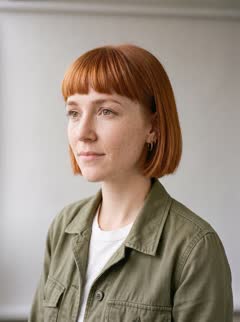
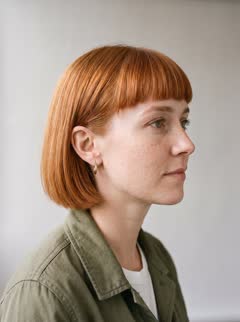
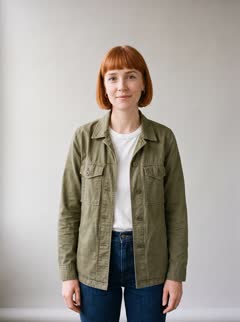
Three scenes, the same face
The short answer
Pick by what your project needs. For the longest single take with references, Kling 4.0 in Kling's app and Pika's Video Studio both reach 30 seconds. For the cheapest start, Google Flow gives 50 credits a day, and paid plans begin at $4.99 a month in the US. For a face trained once, Higgsfield's Soul ID.
For the most reference slots, Pika takes up to 50 and Kling 4.0 up to 15 inputs. To save a character or product once and send the same photos with every clip, without building elements by hand, RefVid does that. Runway works differently: its References keep a character steady in a still image, which you then animate.
Best AI video generator for consistent characters: prices compared
Each price below is the cheapest paid plan on monthly billing, as the vendor's own pricing page showed it on October 24, 2026, before tax. Credits are not a shared unit: 1,000 credits buy very different amounts of video on different apps, so compare what one clip of the length you need costs on each.
| Tool | Cheapest paid plan, monthly | Billed yearly | Free tier |
|---|---|---|---|
| RefVid | $10 a month, 2,000 credits | $96 a year ($8 a month) | 100 credits: one 3-second 720p clip, no watermark, no card |
| Kling AI app | Standard: $6.99 the first month, then $8.80 a month; 660 credits | $79.20 a year, shown as 34% off $120 | Basic plan with no monthly credits listed; watermark removal is a paid benefit |
| Higgsfield | Starter: €19 a month, 270 credits (shown to us in euros; USD not verified) | €19 a month | Free plan with 0 credits and limited use |
| Runway | Standard: $15 a month, 625 credits | $12 a month | 125 one-time credits |
| Pika | Starter: $10 a month, 900 credits | $8 a month | No monthly credits; credit packs only |
| Vidu | Standard: $10 a month, 800 credits | $99 a year ($8.25 a month) | 540p, watermarked downloads; credit amount not published |
| Hailuo AI (MiniMax) | Standard: $10.50 a month, discounted from $14.99; 1,000 credits | $100.80 a year ($8.40 a month) | One-time trial credits; amount not published |
| Google Flow | Google AI Plus: $4.99 a month, 200 extra Flow credits (US price) | Not published | 50 Flow credits a day |
| Pollo AI | Not verified | Not verified | Not verified |
Reference limits and clip length
How many references a tool accepts, and how long one generation can run, decide how much of a character the model sees and how long it has to hold it. These are the limits each vendor publishes for its consistency feature on its own help pages, guides and API docs; none of them are our measurements.
| Tool | How it keeps the character | References | Longest clip |
|---|---|---|---|
| RefVid | A saved subject: the same 1 to 5 photos go with every clip, on Kling 4 or Kling 3.0 Omni | Up to 3 subjects per clip, 1 to 5 photos each | 15 seconds per shot, up to 3 shots |
| Kling AI app | Omni Reference in Kling 4.0, with elements of 2 to 4 photos of one subject | Up to 15 inputs: 10 images, 5 videos, 7 elements | 30 seconds (20 on Kling 4.0 Flash) |
| Higgsfield | Soul ID: an identity trained from your photos, then used across its video models | 20 or more photos recommended for training, up to 80 | Not published; depends on the model |
| Runway | Gen-4 References keep the character in a still image, which you then animate | Up to 3 references | 10 seconds (Gen-4.5 image to video) |
| Pika | Video Studio: attach characters, products and settings and @mention them in the prompt | Up to 50 | 30 seconds |
| Vidu | Reference to Video: a reference subject for each character | 1 to 7 images | 16 seconds |
| Hailuo AI (MiniMax) | Omni Reference on the MiniMax H3 model | Up to 9 images, 3 videos and 3 audio clips, 12 files in all | 15 seconds |
| Google Flow | Ingredients to video: the same images of a character or object from clip to clip | Up to 5 photos (Gemini Omni Flash, per Google's Gemini page) | 10 seconds on Gemini Omni Flash, 8 on Veo 3.1 Fast and Lite |
| Pollo AI | Reference to video on several models | Depends on the model | Depends on the model |
Three ways tools keep a character the same
Every tool here uses one of three methods. Most send reference images with each generation, so the model sees the face in every clip. Higgsfield trains an identity once from many photos. Runway makes a consistent still first and animates it, so the video step sees a single frame.
References with every clip: RefVid, Kling, Pika, Vidu, Hailuo, Google Flow and Pollo. The model has the face, outfit or label in front of it each time, which helps when the head turns or the light changes. The work is in preparing a good set: a clear front view and two or three other angles.
A trained identity: Higgsfield's Soul ID. You upload many photos once and choose the identity by name afterwards. It suits a character you will use for months, and it asks for more photos up front than any of the reference tools.
Image first, then animate: Runway. The still can match the character closely, but image to video only sees that one frame, so anything the frame does not show, such as the side of the face, has to be invented once the camera moves.
Prompt only: her description in words
Four reference photos
What each tool is good at
RefVid: you save a character or product once from 1 to 5 photos, and every clip after that uses the same set, on Kling 4 by default or the cheaper Kling 3.0 Omni. Up to 3 subjects can share a clip. It runs Kling models only, and one shot lasts up to 15 seconds.
Kling AI app: Kling's own app gets new Kling models first, including Kling 4.0's 30-second clips, keyframes and its largest reference budget. You build an element of 2 to 4 photos for each subject yourself.
Higgsfield: one app for many models (it names Seedance 2.0, Veo 3.1 and Kling 3.0), with Soul ID carrying the same face across images and video. Its Starter plan was the most expensive entry plan in our check.
Runway: Gen-4 References keep a character steady in stills from as little as one reference image, and Gen-4.5 animates a still for up to 10 seconds. Runway also offers other companies' video models that take reference inputs.
Pika: Video Studio takes the most references of any tool here, up to 50, mixing characters, products, settings and styles, for clips of up to 30 seconds with sound. The free plan has no monthly credits.
Vidu: Reference to Video takes 1 to 7 images and builds a reference subject for each character, for clips of 3 to 16 seconds. Free downloads carry a watermark.
Hailuo AI: MiniMax's H3 model accepts images, video clips and audio as references, up to 12 files, for clips of 4 to 15 seconds.
Google Flow: Google's filmmaking app reuses the same ingredient images from clip to clip, with 50 free credits a day and the cheapest paid plan in our check. Clips are short, 8 to 10 seconds.
Pollo AI: one app for many video models, with a reference-to-video mode whose limits follow the model you pick. Its pricing page did not load for us on the day of the check.
How we compared
We read every price and limit on the vendor's own site on October 24, 2026: pricing pages, help centres, model guides and API docs. We did not use review sites or price trackers. Where a vendor publishes no number, or its page would not load for us, the tables say so instead of guessing.
We have not run the same references through all nine tools, so this page compares published features, limits and prices, not measured face drift. The clips on this page are RefVid's own output; the other tools are best judged with your own test, described in the next section.
Higgsfield's prices are in euros because that is what its page showed to a visitor from Ireland; Google also lists different prices by country. Some plans were introductory or discounted offers on the day. OpenAI's Sora is not included: OpenAI removed Sora 2 from its API on September 24, 2026, according to its deprecations page.
Sources: kling.ai/app/membership/membership-plan and kling.ai/quickstart/kling-4-model-user-guide; higgsfield.ai/pricing and higgsfield.ai/blog/keep-ai-character-consistent; runway.com/pricing and Runway's help articles on Gen-4 References and Gen-4.5; pika.art/pricing and pika.art/apps/create-video; vidu.com/pricing and vidu.com/ai-reference-to-video; hailuoai.video/subscribe and platform.minimax.io video generation docs; gemini.google/us/subscriptions and support.google.com/flow.
How to test any of them with your own character
Run the same small test on each tool you shortlist. Use one fixed set of photos, three scenes with different light, and the same short action in each. Then compare hair, eyes, skin tone and outfit across the clips, frame by frame, before you pay for a plan.
Good scenes for the test: a neon street at night, a bright kitchen in the morning and a beach at low sun. Strong coloured light is where hair colour and skin tone drift first. Keep the face large in frame and the motion slow, such as a turn to the camera or a slow push-in.
A prompt to start from: "She turns from the window to face the camera and smiles, slow push-in, soft morning light." Change only the setting between the three clips, and never describe her face in the prompt; the photos do that.
Start from a template
Each one opens the studio with the shots, shape and length already set. Add your own product and generate.
Frequently asked questions
- What is the best AI video generator for consistent characters?
- It depends on the job. Kling 4.0 and Pika allow the longest takes (30 seconds), Pika the most references (50), Google Flow the cheapest start, Higgsfield a trained identity, and RefVid a saved set of photos reused in every clip. Test two or three with your own photos before you subscribe.
- Which is the best AI video generator with consistent characters for free?
- Google Flow gives 50 credits a day on any plan. RefVid gives a new account one 3-second 720p clip from your own photos, with no watermark and no card. Runway gives 125 one-time credits, and Vidu's free plan makes 540p clips with a watermark.
- Can I keep two characters consistent in the same clip?
- Yes, on most of these tools. RefVid takes up to 3 saved subjects per clip, Kling 4.0 up to 7 elements, Vidu up to 7 reference images and Pika's Video Studio up to 50 references. Two faces in one shot can borrow features from each other, so keep each one large in frame.
- Is Kling's own app cheaper than using Kling through another app?
- Kling's Standard plan was $6.99 for the first month, then $8.80 a month for 660 credits. Apps that run Kling, such as RefVid, Higgsfield and Pollo, charge in their own credits, so compare what a clip of your length costs. On RefVid a 5-second Kling 4 clip is 290 credits, and plans start at $10 a month for 2,000.
- Why does my character still change between clips?
- Usually the reference set is thin, the face is small in frame, the motion is fast, or the prompt describes the face differently from the photos. Add a clear front view and a three-quarter view, keep the face large, and describe the scene rather than the person. Our face drift guide goes through each cause.
- Is Sora still an option for consistent characters?
- Not through OpenAI's API. OpenAI removed Sora 2 from its API on September 24, 2026, according to its deprecations page, so it is not part of this comparison.
- How current are these prices?
- They were read on October 24, 2026, on each vendor's own pricing page. AI video prices and free tiers change often, so check the vendor's page before you subscribe.