Your figure, coming alive on your desk
Upload a few photos of a figurine, vinyl toy, plush or handmade doll once and RefVid brings it to life: still on the desk at first, then a blink, a look around and a few small steps toward the camera. It stays your figure, with the same paint, shape and details, not a cartoon version of it.
5 s · 9:16 · silent
Sign in, add your subject, and the studio opens with this template filled in. Your first 3-second clip is free: this template’s first shot.
Made from these photos
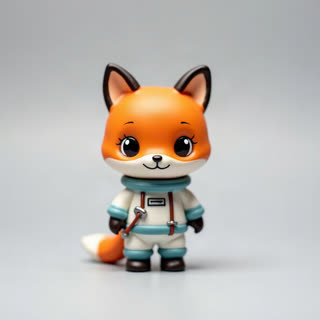
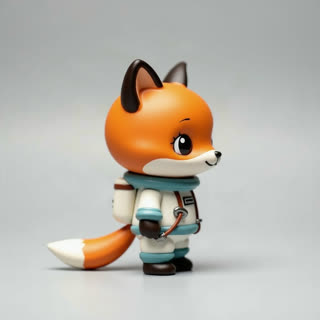
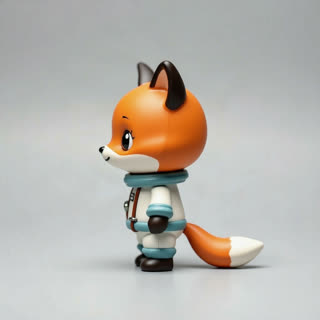
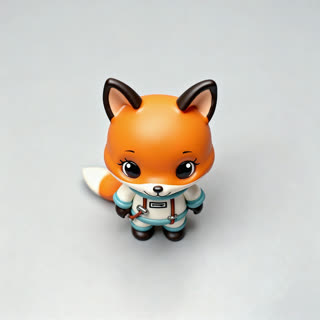
What you get
- Your own figure, toy or plush from 1–5 photos
- 2 shots, 5 seconds, vertical 9:16 for Reels and TikTok
- Keeps the material: vinyl stays glossy, plush stays soft
- No watermark
Who it’s for
For toy collectors, figure painters and small toy brands, for parents making a magical clip of a child’s favourite toy, and for creators who want the toy-comes-to-life trend with their own figure.
The prompt
What the studio fills in for you. Your subject takes the place in brackets; you can change any of it.
- Shot 1[your figure] stands perfectly still on a wooden desk next to a pencil cup and a notebook in soft morning light, like a toy on display. Close-up at the toy’s eye level.
- Shot 2[your figure] comes to life: it blinks, looks around curiously, then takes a few small wobbly steps toward the camera and waves. It is still the same small painted toy, same material and colours. Shallow depth of field.
Make it yours
Pick the desk
Swap the desk for a toy shelf, a bedroom windowsill or a kitchen table at night with a single lamp.
Choose the action
Write a jump, a dance step, a bow, or the toy picking up a pencil instead of waving.
Add a friend
Add a second toy as a subject and write them waking up together and looking at each other.
Photos that work best
Figures, toys and handmade pieces: 1–5 photos against a plain background, front first, then each side, close enough that the paint, stitches or material show. Turn the piece rather than moving the camera, so the light stays the same.
How it works
- Sign in and add your figure from 1–5 photos. Each subject is saved once, so every later template takes one tap.
- The studio opens with this template filled in: both shots, 5 seconds, 9:16. Change any word you like.
- Press Generate. The clip is ready in a few minutes, without a watermark, and the same subject is there for the next one.
Questions
- What kinds of toys work?
- Figurines, vinyl toys, action figures, plush toys, handmade dolls and clay models. Photograph it on a plain background from the front, the side and the back so RefVid knows every side.
- Should I save my figure as a character or a product?
- Either works for this template. Save it as a character if it should act like one in later videos, or as a product if it is something you sell.
- How much does this template cost?
- A new RefVid account’s free credits cover one 3-second clip. The full template is 5 seconds: buy it as a single video, with no plan, or use credits from a pack or plan. Current prices are on the pricing page.
- How do I make a toy come to life on video?
- Photograph it from a few sides on a plain background, save it as a character and open this template.
- Is this figure animation or stop-motion?
- It is generated animation: smooth by default. Write "stop-motion feel" into the prompt for a stepped look.