A 360° turntable video of your product
Product pages convert better when shoppers can see every side. Upload a few photos of your product from different angles and RefVid makes a slow studio turntable spin, square and clean, with your product’s shape, materials and details kept from your photos.
5 s · 1:1 · silent
Sign in, pick or add your subject, and the studio opens with this template filled in. Your first 3-second clip is free.
Made from these photos
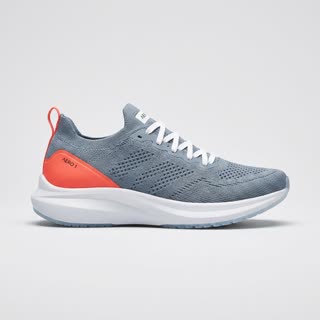
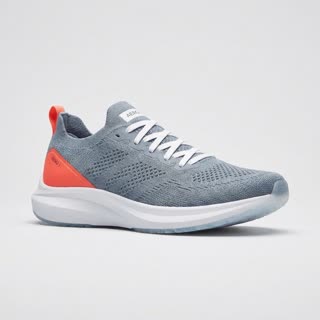
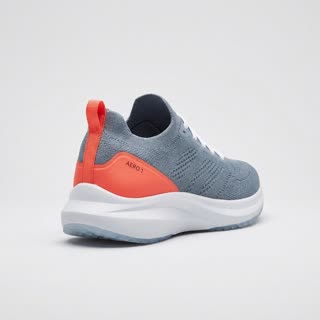
What you get
- Your real product from 1–5 photos
- 1 shot, 5 seconds, square 1:1 for product pages and marketplaces
- Seamless studio background, soft even light
- No turntable, no photographer, no watermark
Who it’s for
For online shops that need a rotating view without a turntable rig, for marketplaces that reward product video, and for makers listing one-off pieces. Buyers see the back and sides they would otherwise ask about.
The prompt
What the studio fills in for you. Your subject takes the place in brackets; you can change any of it.
- [your product] on a round white turntable in a photo studio, rotating slowly through a full 360 degrees, light grey seamless background, soft even studio light, locked-off camera, sharp focus on every detail.
Make it yours
Match your shop
Change the light grey backdrop to white for marketplaces, or your brand colour for your own store and ads.
Add a base
Describe a marble disc, a wooden board or a mirror surface under the product for a premium look.
Show it in use
After the turn, write a hand reaching in to pick the product up, turning the clip into a short ad.
Photos that work best
Products: 1–5 photos on a plain background — the front with the label readable, then the back and one side. Shoot in soft daylight to avoid glare on glass and gloss; the video keeps the label only as sharp as your best photo.
How it works
- Sign in and add your product from 1–5 photos. Each subject is saved once, so every later template takes one tap.
- The studio opens with this template filled in: the shot, 5 seconds, 1:1. Change any word you like.
- Press Generate. The clip is ready in a few minutes, without a watermark, and the same subject is there for the next one.
Questions
- Which photos make the best 360 video?
- Photos from several sides: front, side, back and a three-quarter view, on a plain background. The more sides RefVid sees, the less it has to guess on the far side of the spin. The studio can also draw missing angles from one photo.
- Can I change the background colour?
- Yes. The template opens in the studio with the prompt filled in; change "light grey seamless background" to any colour or surface before you generate.
- How much does this template cost?
- A new RefVid account’s free credits cover one 3-second clip. The full template is 5 seconds: buy it as a single video, with no plan, or use credits from a pack or plan. Current prices are on the pricing page.
- Is a 360 product video worth it for a small shop?
- Buyers see the back and sides they would otherwise ask about, and many marketplaces favour listings with video.
- Is this a product image to 360 degree video generator?
- Yes: upload a few photos of your product from different sides and the template turns them into a full turntable spin, with the label and shape kept from your photos.