A slow-motion splash for your product
The classic drinks and skincare shot, with your product: it falls into clear water in slow motion, a crown of droplets and bubbles bursting around it, the label still sharp. RefVid keeps the bottle’s shape, colour and label from your photos.
5 s · 9:16 · silent
Sign in, pick or add your subject, and the studio opens with this template filled in. Your first 3-second clip is free.
Made from these photos
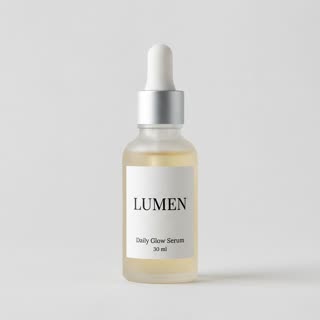
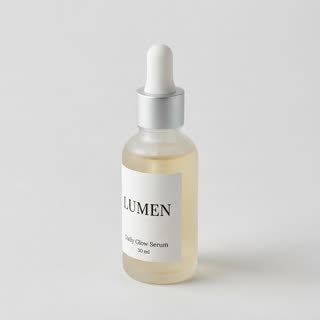
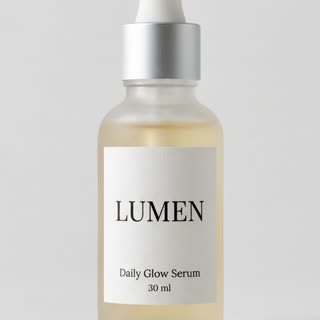
What you get
- Your real product from 1–5 photos, label and all
- 1 shot, 5 seconds, vertical 9:16
- Slow motion, studio light, clean background
- No watermark
Who it’s for
For drinks, skincare and fresh-food brands whose products should feel cool and fresh, for summer campaigns, and for ads that need a scroll-stopping first second.
The prompt
What the studio fills in for you. Your subject takes the place in brackets; you can change any of it.
- Slow motion: [your product] drops into a tank of crystal-clear water against a soft blue gradient background, a burst of bubbles and droplets exploding around it, then it settles upright with the label facing the camera. Bright studio light, macro detail.
Make it yours
Change the liquid
Write milk, juice or a fizzy soda instead of clear water to match what is inside your product.
Add fruit or ice
Describe lemon slices, mint leaves or ice cubes splashing in around the product.
Pick the colour
Swap the blue gradient for your brand colour or a summer orange for a seasonal ad.
Photos that work best
Products: 1–5 photos on a plain background — the front with the label readable, then the back and one side. Shoot in soft daylight to avoid glare on glass and gloss; the video keeps the label only as sharp as your best photo.
How it works
- Sign in and add your product from 1–5 photos. Each subject is saved once, so every later template takes one tap.
- The studio opens with this template filled in: the shot, 5 seconds, 9:16. Change any word you like.
- Press Generate. The clip is ready in a few minutes, without a watermark, and the same subject is there for the next one.
Questions
- Which products work for a splash?
- Bottles, cans, jars, fruit and anything that would believably go into water. For very small items, the macro and texture templates usually look better.
- Can I change the water to milk or juice?
- Yes: change "clear water" in the prompt to milk, juice or coloured liquid before you generate.
- How much does this template cost?
- A new RefVid account’s free credits cover one 3-second clip. The full template is 5 seconds: buy it as a single video, with no plan, or use credits from a pack or plan. Current prices are on the pricing page.
- Which water splash product shots work best?
- Bottles, cans and jars with a clear label. Very small or very flat products read less well in a splash.
- Can I make a splash commercial without a studio?
- Yes: the tank, water and light are generated, so you only need a few photos of the product.