Try on three Halloween costumes in one video
The mirror-spin costume try-on is this October’s favourite way to show off options: you spin in front of a bedroom mirror and every turn lands in a new costume. Upload a few photos of yourself once and RefVid makes three shots — a vampire, a pumpkin and a witch — with your own face in each.
10 s · 9:16 · silent
Sign in, add your subject, and the studio opens with this template filled in. Your first 3-second clip is free: this template’s first shot.
Made from these photos

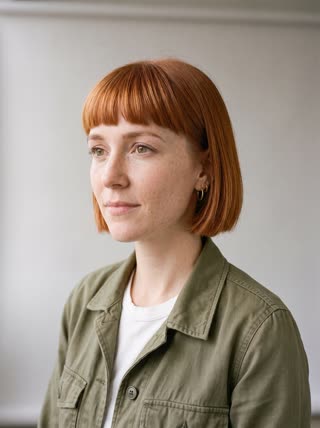
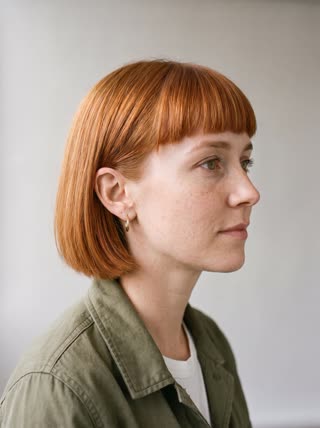
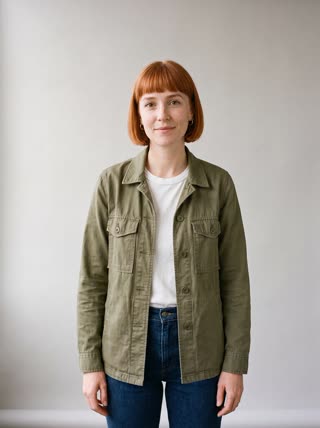
What you get
- You from 1–5 photos, your own face in every costume
- 3 shots, 10 seconds, vertical 9:16 for TikTok and Reels
- Original costumes, no film or TV characters
- No watermark
Who it’s for
For people who can’t decide on a costume, for creators who want the classic spin transition without three outfit changes, and for costume shops showing several looks on the same model.
The prompt
What the studio fills in for you. Your subject takes the place in brackets; you can change any of it.
- Shot 1[you] in everyday clothes spins once in front of a tall bedroom mirror and lands facing the camera as a vampire: bare head, a high-collared black cape with red lining, small plastic fangs, face fully visible. Warm fairy lights, phone-camera feel.
- Shot 2Hard cut: [you] spins again and the cape is gone; she lands in a round, puffy orange pumpkin costume with a green stem collar, bare head, laughing at the camera.
- Shot 3Hard cut: [you] spins a third time and the pumpkin costume is gone; she lands as a witch in a long black dress and a black pointed hat, giving the camera a playful wink.
Make it yours
Pick three costumes
Replace the vampire, pumpkin and witch with your own three, described by clothing and colour rather than by a film or character name.
Change the mirror
Move the try-on to a shop changing room, a hallway with string lights, or a party doorway with friends watching.
Make the last one a twist
Write a funny final costume, such as a giant hot dog or a cardboard robot, for a punchline at the end.
Photos that work best
People: 1–5 photos with the face clearly visible and evenly lit — a straight-on portrait first, then a three-quarter angle and a profile. Skip sunglasses, heavy filters and group shots; if a photo shows more than one person, the studio can’t tell who you mean.
How it works
- Sign in and add you from 1–5 photos. Each subject is saved once, so every later template takes one tap.
- The studio opens with this template filled in: all 3 shots, 10 seconds, 9:16. Change any word you like.
- Press Generate. The clip is ready in a few minutes, without a watermark, and the same subject is there for the next one.
Questions
- Can I pick different costumes?
- Yes. Each costume is written in its own shot in the studio; change the pumpkin to a pirate or the witch to a cat before you generate.
- Why not famous movie costumes?
- Film and TV characters belong to their studios, so the template sticks to classic costumes anyone can wear. You can describe your own look in each shot.
- How much does this template cost?
- A new RefVid account’s free credits cover one 3-second clip. The full template is 10 seconds: buy it as a single video, with no plan, or use credits from a pack or plan. Current prices are on the pricing page.
- How do I make a Halloween costume transition video?
- Save yourself once from a few photos and open this template: the three spins and costumes are written. Change the costumes to your own by describing them.
- Does a costume transition video need special editing?
- No editing: the hard cuts are part of the generated clip, so there is nothing to line up by hand.