Your plushie’s big city adventure
Plushie adventures are a whole genre: a stuffed toy riding trams, ordering coffee, watching sunsets. Upload a few photos of yours once and RefVid sends it out in three shots with a gentle stop-motion feel. It stays your plushie — the same fur, face and accessories.
10 s · 9:16 · silent
Sign in, add your subject, and the studio opens with this template filled in. Your first 3-second clip is free: this template’s first shot.
Made from these photos
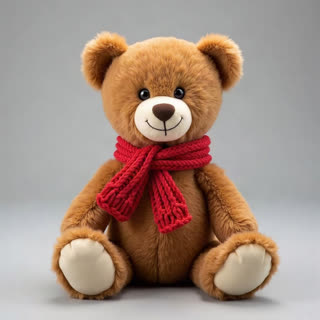
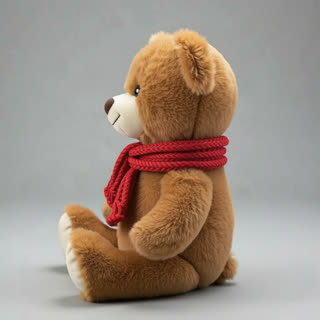
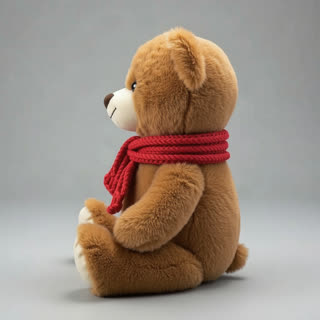
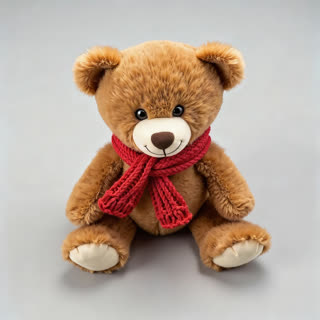
What you get
- Your own plush toy from 1–5 photos
- 3 shots, 10 seconds, vertical 9:16
- Stop-motion feel, city scenes
- No watermark
Who it’s for
For plushie collectors and teddy bear accounts, for parents making a story with a child’s favourite toy, and for handmade toy sellers showing their characters in a little world. The same plushie appears in every scene.
The prompt
What the studio fills in for you. Your subject takes the place in brackets; you can change any of it.
- Shot 1Stop-motion feel: [your plushie] sits on a wooden seat of an old yellow city tram by the window, the street sliding past outside, morning light.
- Shot 2[your plushie] sits at a tiny café table next to a cup of cocoa with whipped cream, turning its head toward the camera.
- Shot 3[your plushie] sits on a stone bridge railing watching a river sunset, the city lights coming on behind.
Make it yours
Visit your city
Name real places in each shot: your local tram, a market, a famous bridge, so the adventure happens where you live.
Tell a bedtime story
Rewrite the three shots as a story for a child: waking up, a picnic in the park, falling asleep under a lamp.
Make it seasonal
Add snow and a tiny scarf for winter, or beach towels and ice cream for a summer trip.
Photos that work best
Figures, toys and handmade pieces: 1–5 photos against a plain background, front first, then each side, close enough that the paint, stitches or material show. Turn the piece rather than moving the camera, so the light stays the same.
How it works
- Sign in and add your plushie from 1–5 photos. Each subject is saved once, so every later template takes one tap.
- The studio opens with this template filled in: all 3 shots, 10 seconds, 9:16. Change any word you like.
- Press Generate. The clip is ready in a few minutes, without a watermark, and the same subject is there for the next one.
Questions
- Does the plushie move by itself?
- A little, like stop-motion: it sits, tilts and looks around. Describe more in each shot if you want it to wave or hop.
- Can it visit my city?
- Yes: change the tram, café and bridge to places from your city before you generate.
- How much does this template cost?
- A new RefVid account’s free credits cover one 3-second clip. The full template is 10 seconds: buy it as a single video, with no plan, or use credits from a pack or plan. Current prices are on the pricing page.
- What are some plushie video ideas beyond this one?
- A bedtime story, a picnic, a seasonal trip with snow or the beach; rewrite the three shots and the same plushie appears in each.
- Can I make a teddy bear adventure for a child?
- Yes: save the child’s real teddy once and write a little story in three scenes. The bear stays the same in every shot.