A cinematic reveal for your product
The launch-film look in two shots: your product on a dark pedestal, a beam of light sweeping across it out of darkness, then a slow push-in to the label. RefVid keeps your product’s shape, finish and label from your photos, so it reads as your product, not a stand-in.
5 s · 16:9 · silent
Sign in, add your subject, and the studio opens with this template filled in. Your first 3-second clip is free: this template’s first shot.
Made from these photos
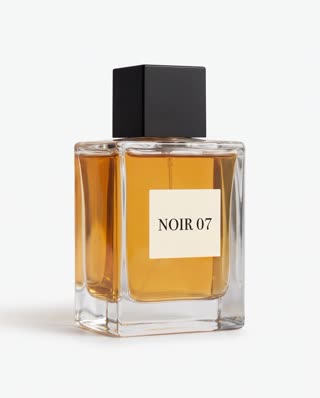
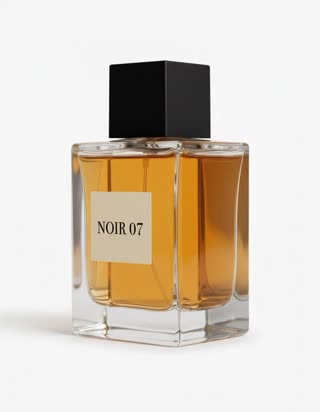
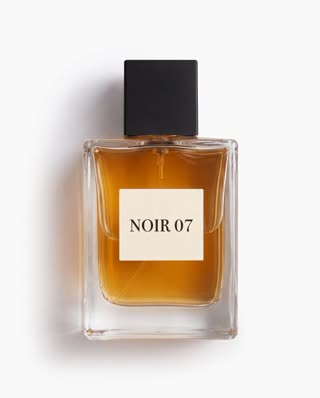
What you get
- Your real product from 1–5 photos
- 2 shots, 5 seconds, wide 16:9 for launch posts, YouTube and websites
- Low-key lighting with a light sweep and reflections
- No watermark
Who it’s for
For product launches, website hero sections and pre-order pages, for brands that want a premium look without a studio day, and for small makers presenting a new piece with the drama it deserves.
The prompt
What the studio fills in for you. Your subject takes the place in brackets; you can change any of it.
- Shot 1Darkness, then a narrow beam of warm light sweeps slowly across [your product] standing on a black stone pedestal, catching its edges and reflections. Low-key, cinematic, wisps of haze.
- Shot 2Slow push-in on [your product] as the light settles, the label sharp and centred, deep black background.
Make it yours
Pick the pedestal
Swap the black stone for brushed metal, a slab of wood, or a pool of still water with reflections.
Change the light
Describe a cool blue beam, a sunrise glow, or two coloured lights crossing for a tech product.
Make it vertical
Switch the ratio to 9:16 in the studio for a launch post on Reels or TikTok; the shots stay the same.
Photos that work best
Products: 1–5 photos on a plain background — the front with the label readable, then the back and one side. Shoot in soft daylight to avoid glare on glass and gloss; the video keeps the label only as sharp as your best photo.
How it works
- Sign in and add your product from 1–5 photos. Each subject is saved once, so every later template takes one tap.
- The studio opens with this template filled in: both shots, 5 seconds, 16:9. Change any word you like.
- Press Generate. The clip is ready in a few minutes, without a watermark, and the same subject is there for the next one.
Questions
- Does the reveal work for small products?
- Yes: bottles, watches, headphones, cosmetics and sneakers all work. Give RefVid a sharp photo of the front and one or two angles so the label and edges stay right in the close-up.
- Can I make it vertical?
- Yes. The template opens in the studio at 16:9; switch the ratio to 9:16 before you generate and the same two shots are framed for phones.
- How much does this template cost?
- A new RefVid account’s free credits cover one 3-second clip. The full template is 5 seconds: buy it as a single video, with no plan, or use credits from a pack or plan. Current prices are on the pricing page.
- Can I use this as a product launch video AI clip?
- Yes: it is made for launches, pre-order pages and website heroes. Add your launch date as text in your editor.