A 360° showcase for your figure
For a collection post or a shop listing: upload a few photos of your figure once and RefVid films it like a product page — a slow 360° turn on a lit turntable, then a macro close-up of the face and paint. It stays your figure, with the same sculpt and colours.
5 s · 1:1 · silent
Sign in, add your subject, and the studio opens with this template filled in. Your first 3-second clip is free: this template’s first shot.
Made from these photos
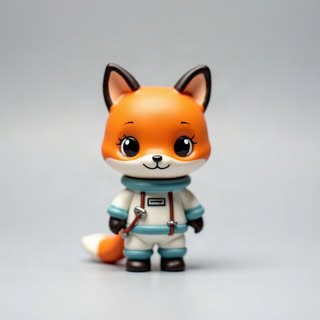
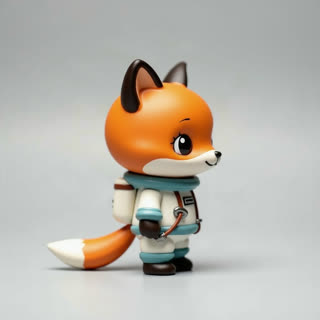
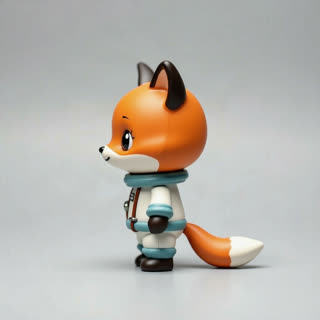
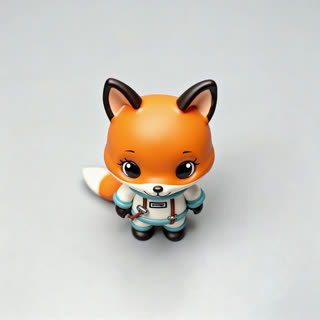
What you get
- Your own figure or toy from 1–5 photos
- 2 shots, 5 seconds, square 1:1
- Turntable spin and macro detail
- No watermark
Who it’s for
For collectors cataloguing a shelf, for resin and miniature painters showing their brushwork, and for small studios selling figures online. Buyers ask to see every side before paying; this shows it in one clip.
The prompt
What the studio fills in for you. Your subject takes the place in brackets; you can change any of it.
- Shot 1[your figure] on a small round turntable in a dark display cabinet with a soft spotlight, rotating slowly through a full turn. Clean reflections on the glass shelf.
- Shot 2Macro close-up of [your figure]’s face and painted details, the light gliding across them, shallow depth of field.
Make it yours
Light it like a museum
Swap the cabinet for a white plinth with gallery lighting, or a black background with a single rim light for a dramatic look.
Add its world
Describe a small diorama base, such as moss and rocks or a city street, so the figure turns inside its own scene.
Focus on the paint job
Rewrite the second shot to linger on one detail you are proud of, like the eyes, a weapon or the texture of a cloak.
Photos that work best
Figures, toys and handmade pieces: 1–5 photos against a plain background, front first, then each side, close enough that the paint, stitches or material show. Turn the piece rather than moving the camera, so the light stays the same.
How it works
- Sign in and add your figure from 1–5 photos. Each subject is saved once, so every later template takes one tap.
- The studio opens with this template filled in: both shots, 5 seconds, 1:1. Change any word you like.
- Press Generate. The clip is ready in a few minutes, without a watermark, and the same subject is there for the next one.
Questions
- Which photos make the best 360?
- Front, side, back and a three-quarter view on a plain background. The studio can also draw the missing angles from one photo.
- Can I show a whole shelf of figures?
- Add each figure as its own subject and include them in the clip; up to three subjects can share one video.
- How much does this template cost?
- A new RefVid account’s free credits cover one 3-second clip. The full template is 5 seconds: buy it as a single video, with no plan, or use credits from a pack or plan. Current prices are on the pricing page.
- Do I need a real figure turntable?
- No. Photograph the figure from a few sides on a plain background and the clip shows the full turn.
- Can I make action figure videos for my collection?
- Yes: save each figure once and open this template for each. The cabinet, light and turn stay the same, so a collection looks consistent.