How to make a wallet video with AI: the real making of a 5-second leather wallet clip
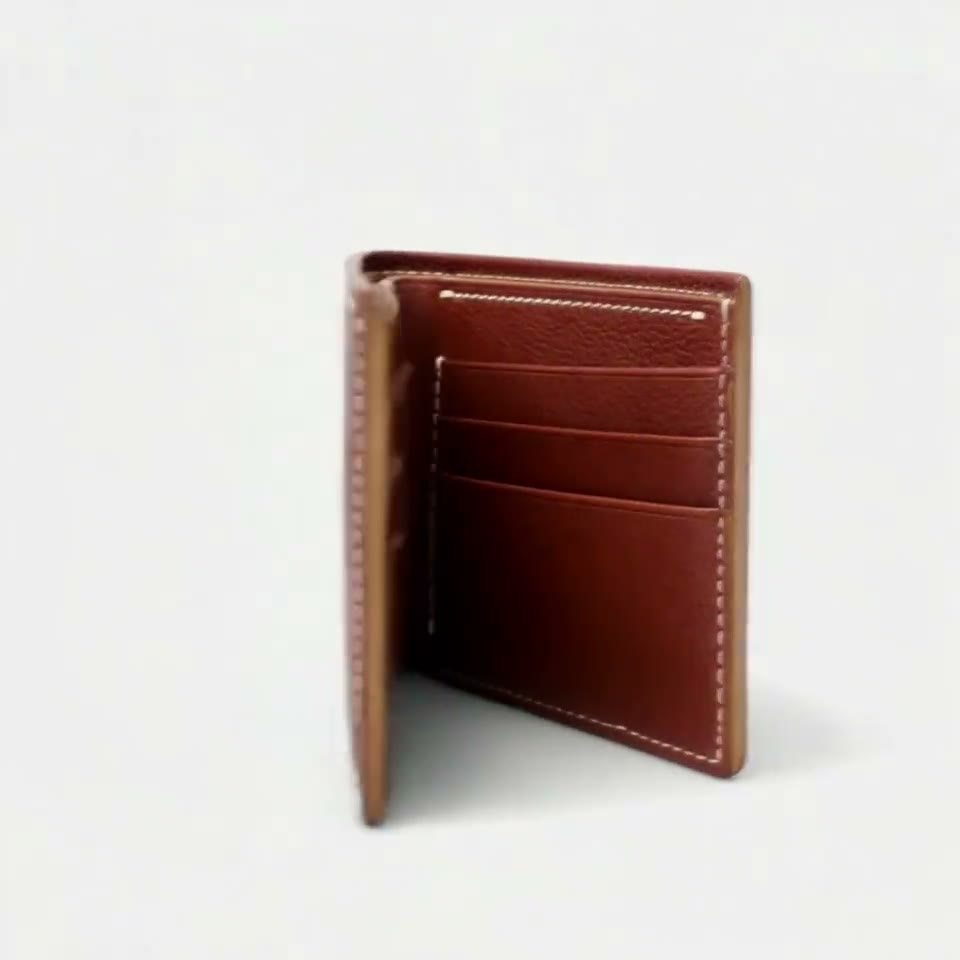
A chestnut leather wallet that turns, opens to show its card slots and closes again, made from a shop's own product photos in three takes.
Made for Emery · Alden Wallet in Chèvre
“Thanks for your product, it looks great.”

This is the making of a 5-second clip of the Alden wallet by Emery, a leather-goods brand in the UAE: the chestnut bifold stands slightly open, turns, opens to show its card slots and closes again. It took three rounds of first frames and three takes on Kling 3.0 Omni, 434 credits in all, on one afternoon. Below is every step in order, what went wrong at each one, and the picture we checked it on.
- Brand
- Emery, leather goods, UAE
- Product
- Alden RFID wallet, chestnut chèvre
- Model
- Kling 3.0 Omni, 720p, sound off
- Clip
- 5 seconds, square 1:1
- Takes
- 3, 434 credits in all
- Product page
- Alden Wallet in Chèvre
The brief: a 5-second clip of a real leather wallet
We offered Emery a free 5-second clip of one of their products. Noor at Emery replied with one link: the Alden RFID wallet in chestnut chèvre, a slim bifold in goat leather. Its product page already had a 19-second video with people and text; what it didn't have was the wallet on its own, in a studio.
Before drawing or generating anything we read all 12 photos on the page and wrote down what the wallet is: a landscape bifold with square corners, cream saddle stitching on three outer edges and none on the fold, a thin mustard-ochre lining at the open edges, three card slots on each inner half and a small EMERY deboss inside. The outside carries no logo.
Five of those photos, all chestnut, went into the RefVid studio as one saved product. Every frame and every take after that was checked against them.

Emery's photo: the closed front

Emery's photo: the inside
First plan: a 360 turntable, and the drawn frames we rejected
We started from our 360 turntable template, the shot we had offered. The problem showed up before any generation: no photo shows the closed wallet's back half. An earlier 360 clip for another shop had failed exactly there, with an invented back, a second mark and stitching on all four sides.
We also wanted the inside in the clip, because the card slots are what a wallet buyer looks for. So the next frames, drawn with an image model, stood the wallet half open in a V on the turntable, both outer halves facing out and a glimpse of the lining between them.
All of them were rejected, for two reasons. The inner layers stood taller than the outer covers, which never happens on the real wallet: in every photo the card slots sit below or flush with the cover's edge. And the leather came out as a stamped maze pattern, not the fine, irregular grain of goat leather.

Drawn from words: rejected

From a real pose photo: kept (step 4)
The honest fallback: their own photo, lying flat
The fix with nothing drawn was Emery's own photo 9: the chestnut wallet closed and lying flat, seen at three-quarter from above, cropped square as the first frame. A spin in its own plane shows only that top face and the four edges, all of them photographed, so the model has nothing to invent.
It was honest, but it gave up the inside. The card slots, the lining and the EMERY deboss would never appear, and a clip of the closed top face adds little next to the photos already on the page. So the shot changed: the wallet would stand, open, and close again.

Emery's photo 9, cropped square
How we drew the first frame: a real pose photo, recoloured
The new shot needed the wallet standing slightly open, as in Emery's photo 8. That photo shows the black version, so instead of describing the pose in words we gave the image model photo 8 as the pose and asked it to change only the colour and stitching to chestnut, from the chestnut photos.
The pose, the angle, the size of the opening and every layer's height came from a real photo, so this time nothing stood above the covers. We then matched the leather colour to Emery's front photo with a local colour correction: the centre of the frame reads RGB 135, 59, 43 against the photo's 136, 60, 43.
We also drew an open reference: the wallet opened like a book, three card slots on each half, laid out from Emery's black open photo and coloured from the chestnut close-ups. It went into the saved product as a sixth photo, so the model could see the whole inside. Two drawn closed end frames were thrown out: their grain looked crackled and the wallet too thin.

Emery's photo 8, black: the pose
Recoloured to chestnut: the first frame

Open reference: added as a sixth photo

Drawn end frame: rejected
Generating the Kling AI product video: take 1 and the third panel
Every take ran in the RefVid studio on Kling 3.0 Omni: square 1:1, 720p, sound off, the six photos as the product and the recoloured photo as the first frame. A 5-second take costs 155 credits.
Take 1 also had a last frame: the first frame mirrored, so that after a half turn the wallet would end on its other side. The prompt timed the move: a quarter turn while opening to about 135 degrees by 2.25 s, a half-second hold, then a second quarter turn while closing.
Read at 8 frames a second, it failed three ways. Between 0.75 and 1.25 s a third panel appeared between the two halves. The open pose held for about 1.2 s, not half a second. And after the right half closed, the left half swung in too and the whole wallet shifted, to land on the mirrored last frame's angle.
First frame

Last frame: the first, mirrored

Take 1 at 1.0 s: a third panel

Take 2 at 1.0 s: two halves
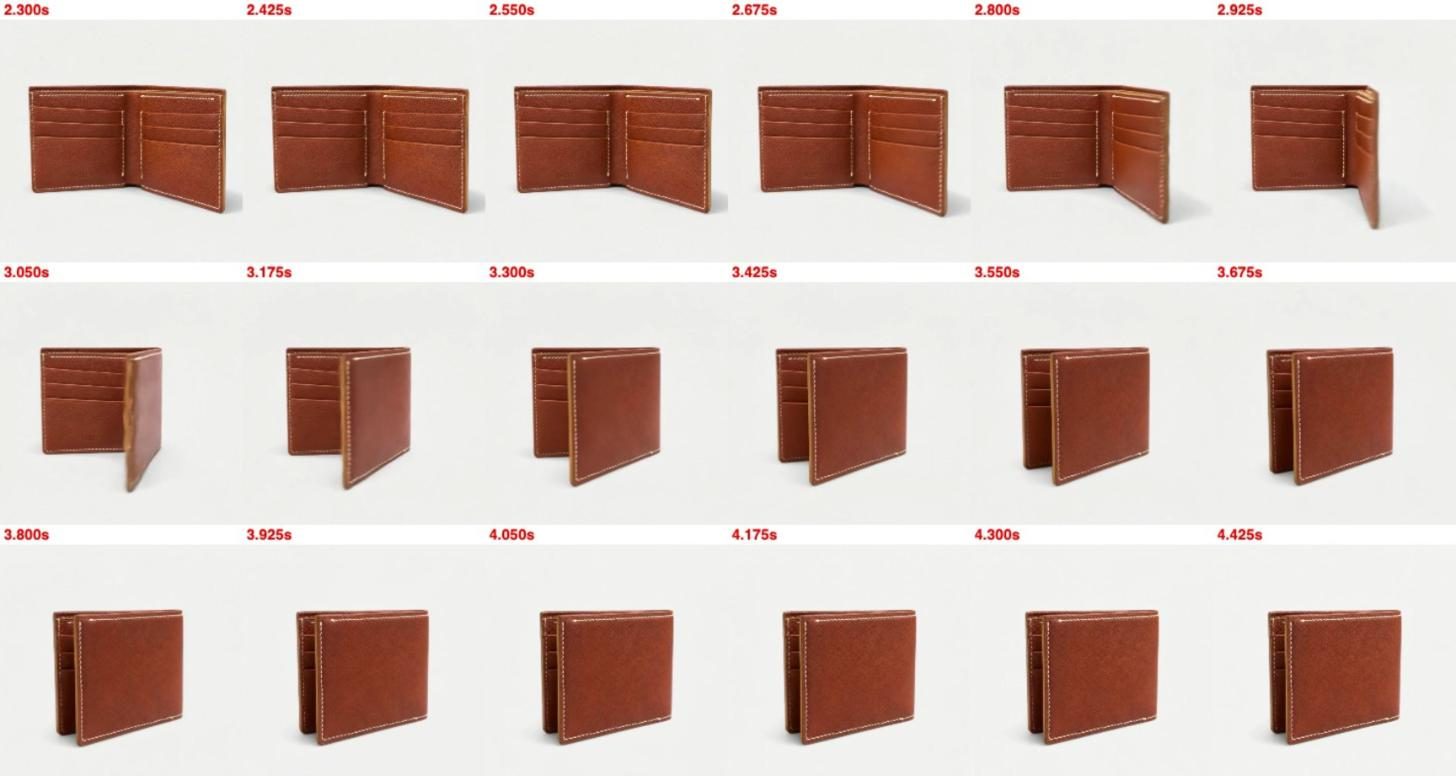
Take 2: no last frame, and the words "exactly two halves"
Take 2 changed two things and nothing else. The last frame went, since it was what forced the extra move. And the prompt now says what the wallet is: a bifold of exactly two halves, never a third panel, and only the right half swings shut while the rest stays still.
The prompt, as sent:
"Alden Wallet in Chèvre standing upright on an off-white studio surface. It is a bifold: exactly two halves joined at the fold, never a third panel or extra flap. From 0 to 2 seconds it turns a quarter of the way, bringing its open side round to face the camera, and opens like a book as it turns, to about 135 degrees, until both inner halves face the camera, showing the chestnut card slots, the cream stitching and the small EMERY deboss inside. It pauses only for a brief moment, under half a second. Then the right half alone swings shut onto the left half in one slow, smooth, continuous motion, and is fully closed at 5 seconds; while it closes, the left half and the whole wallet stay exactly where they are, without sliding, turning or jumping. The card slots always stay below the top edges of the outer covers. Off-white seamless background, soft even studio light, locked-off camera, sharp focus on every detail."
The result: two halves in every frame, a smooth close, the card slots below the covers' top edges. It isn't perfect: it holds open for about 1.6 s, and at 4.5–4.75 s the closed wallet turns quickly to face the camera. That turn ends the clip on the wallet's front, so we kept it.
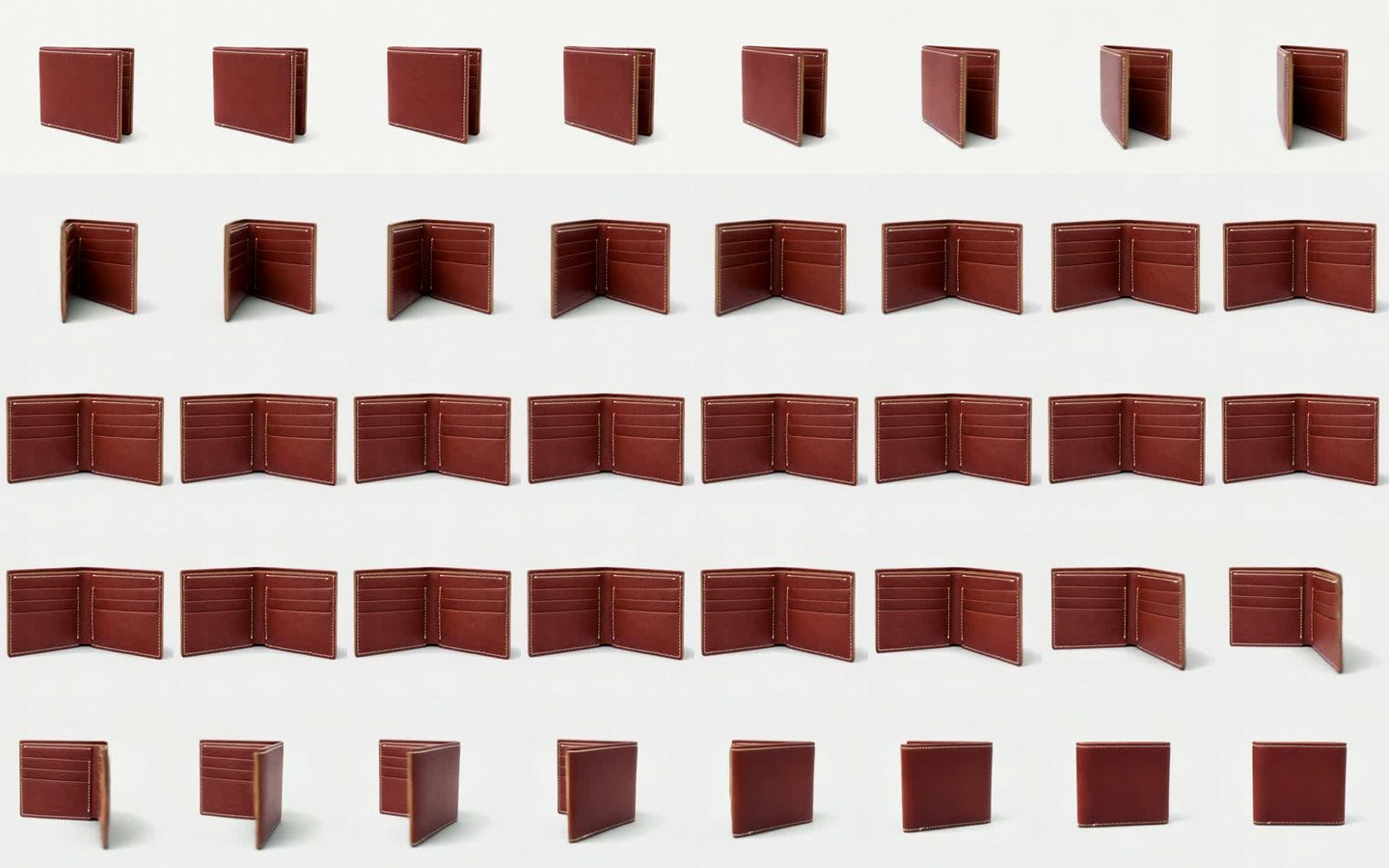
Take 3 at 4 seconds, and why we went back to take 2
The hold looked like spare time, so take 3 ran the same first frame and prompt at 4 seconds, for 124 credits. The hold got shorter, but the turn went with it: the wallet opened and closed, and never turned to face the camera at the end.
The turn is what makes the clip feel like a product shot rather than a door opening, so take 3 was dropped and take 2 is the clip Emery got.
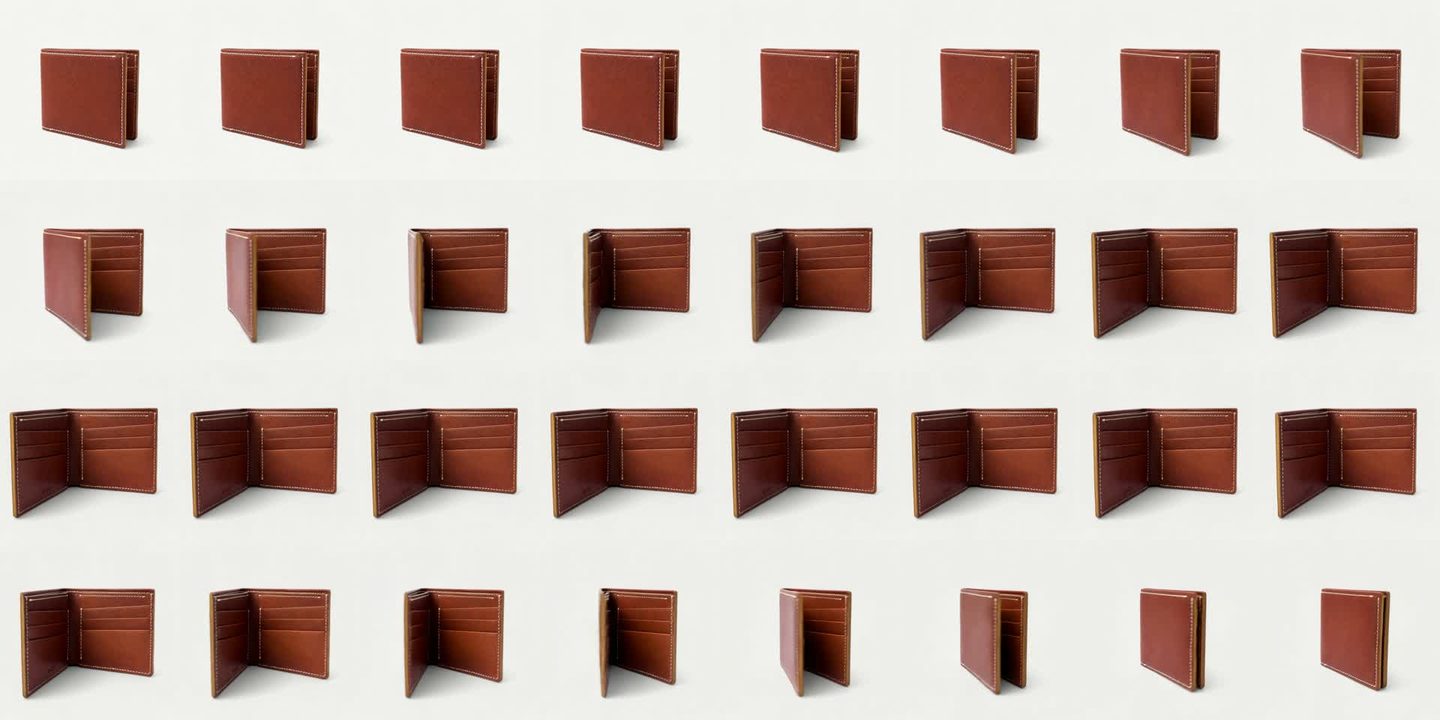
Delivered: free to use, with no watermark
- The clip went to Noor at Emery the same afternoon, free to use on their store, marketplaces, social and ads, with no watermark. She agreed to us showing it here.
- It has its own share page on RefVid, where anyone can watch or download it.
What we learned about the Kling first frame and last frame
- Real photos beat drawn frames. Every drawn frame that failed, failed on something a photo gets right for free: the height of the layers, the grain, the thickness. Give the image model a real pose photo. Recolouring a photo of the black wallet in the right pose worked on the first try; describing the pose in words failed three times.
- A mirrored last frame forces extra motion. The model has to reach that exact angle, so it adds a move to get there: here, a second closing and a shift of the whole wallet.
- Kling 3.0 Omni fills spare seconds with a hold. When the motion in the prompt is shorter than the clip, it pauses, whatever the prompt says about pausing briefly. Shortening the clip removed the turn as well as the pause.
| Take | Frames | Length, credits | Result |
|---|---|---|---|
| 1 | First frame + mirrored last frame | 5 s, 155 | Dropped: a third panel at 0.75–1.25 s, a 1.2 s hold, a shift at the end |
| 2 | First frame only | 5 s, 155 | Kept: two halves throughout, a 1.6 s hold, a quick turn at 4.5 s |
| 3 | First frame only | 4 s, 124 | Dropped: a shorter hold, but no turn |
Make one of your own product
- The open-and-close shot from take 2 is now a template. Save 1–10 photos of your wallet, with one of it opened flat and a close-up of the card slots, and the studio opens with the shot already written. Your first 3-second video is free.
- For a closed product that should spin, start from the 360 turntable template instead, with a first frame made from a real photo.
Try it with your own product
The same shot is ready below: add photos of your product and press Generate. Your first video is free.
First video free, no card
Start from a template
Each one opens the studio with the shots, shape and length already set. Add your own product and generate.
More product videos
Product videos →

Frequently asked questions
How long did it take to make the wallet clip?
About four hours on 5 November, from 11:25 to 15:27 UTC: reading Emery's 12 photos, three rounds of first frames, three takes of a few minutes each and a frame-by-frame check of every take.
How much did the clip cost?
434 credits for three takes on Kling 3.0 Omni: 155 for each 5-second take and 124 for the 4-second one. A single video on RefVid starts at $2.99, credit packs at $9.90 and plans at $10 a month.
Should I use a Kling first frame last frame pair for a product turn?
Only when the last frame is a pose the product reaches naturally from the first. Ours was the first frame mirrored, and the model added a second close and a shift of the whole wallet to land on it. Without a last frame, take 2 moved smoothly: give a first frame, describe the end in words, and check the take frame by frame.
Why not draw the first frame from a prompt?
Because drawn details drift. Our drawn frames put the card slots above the covers and gave the leather a stamped pattern. A real photo in the right pose kept the shape, even though Emery's photo 8 shows the black wallet: only the colour had to change, and we checked it against the photos.
Why does the wallet pause in the middle of the clip?
Kling 3.0 Omni filled the spare time with a hold. The opening and closing we described took less than 5 seconds, so the model held the open pose for about 1.6 seconds, although the prompt asked for under half a second. Cutting the clip to 4 seconds removed the turn too, so we kept the pause.
How to make product ads with AI from my own photos?
Save 1–10 photos of your product once, start from a template close to the shot you want, and generate a 5-second clip. For a wallet: the closed front, the inside opened flat and a close-up of the card slots, then the wallet template. If you have a photo of the product in the pose you want, use it as the first frame.