Kling 3.0 Omni Free AI Video Generator Online - RefVid
Turn your own photos into videos in minutes · Your first video is free, no watermark





First video free, no card
Kling 3.0 Omni free online: the box above runs Kling 3.0 Omni in your browser, and a new account's 180 free credits cover a 5-second Kling 3.0 Omni clip at 720p without sound, with no card and no watermark. Add 1 to 10 photos of a person, product or pet, write the scene and press Generate.
Kling 3.0 Omni is the model RefVid's free clip runs on.
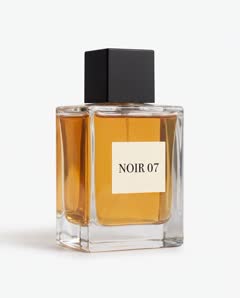
NOIR 07: 3 photos



How to use Kling 3.0 Omni free
- Sign in with Google or an email code; no card is asked for. The account gets 180 free credits, enough for one 5-second Kling 3.0 Omni clip at 720p without sound, with credits to spare. In some regions new accounts get a free clip on Vidu Q2 instead.
- The studio shows what a clip costs before anything runs. Sound, 1080p or a longer clip costs more than the free credits; the box says so and offers what fits. RefVid never adds a watermark.
Make a Kling 3.0 Omni video online in 3 steps
- 1. Add 1 to 10 photos of your subject in the box at the top of this page: front, three-quarter and profile for a person, the hero angle, the back and the logo for a product. The box is already set to Kling 3.0 Omni.
- 2. Write the scene: where the subject is, what happens and how the camera moves. Leave out what the photos already show.
- 3. Press Generate. If you are not signed in, you sign in first and the clip starts right after. A clip usually takes 2 to 10 minutes, and we email you when it is ready.
What Kling 3.0 Omni is
- Kling 3.0 Omni is Kuaishou's reference video model from February 2026: it keeps a character or product from your photos the same in a new scene, in up to 15 seconds, with sound optional. RefVid runs it through fal.ai, Standard for 720p and Pro for 1080p.
- In Settings you pick 3 to 15 seconds, split into up to 3 shots if you want cuts, 16:9, 9:16 or 1:1, 1080p and sound. It costs about half as much per second as Kling 4.
After the free clip
- Every clip is priced in credits per second. A single video costs from $2.99, a one-time credit pack from $9.90 and a monthly plan from $10; credits never expire, and a failed clip gives its credits back automatically.
More on AI video models
Text to video AI →



Frequently asked questions
Is Kling 3.0 Omni free online?
Your first clip is: a new account gets 180 free credits, which cover a 5-second Kling 3.0 Omni clip at 720p without sound, with no card and no watermark.
Can I use Kling 3.0 free without the Kling app?
Yes. The box at the top of this page runs Kling 3.0 Omni through fal.ai's API, in your browser. You need no Kling account and no API key.
Do I need to log in?
Yes, to save your photos and clips to you: sign in with Google or a code sent to your email. No card is asked for.
Does the free clip have a watermark?
No. RefVid never adds a watermark, on free or paid clips.
What does Kling 3.0 Omni cost after the free clip?
Clips are priced in credits per second, shown before anything runs. A single video costs from $2.99, a credit pack from $9.90 and a plan from $10 a month.